
Table of Contents
The Top WordPress Speed Plugins (Right Now)
Why “Best Plugin” Is the Wrong Question
Before Installing Anything: Audit What’s Already There
Choose Your Stack by Hosting Environment
Full Stack by Environment at a Glance
Image Optimisation: Plugin vs. Build Time
Script & Asset Management: Where Plugins Fall Short
Here’s Why Your WordPress Site Is Still Slow After Installing Speed Plugins
Look closely at high-performance WordPress sites and you will notice that they share something less obvious: every tool in their stack was chosen to match the environment it runs in. This guide starts with the top plugins, then walks you through exactly how to choose the right stack for your setup.
The Top WordPress Speed Plugins (Right Now)
Before we get into strategy, here’s the shortlist of plugins we actually deploy across client sites which we reach for professionally, when performance matters.
- LiteSpeed Cache (Caching) : Deep server-level integration for LiteSpeed hosting. Unmatched on compatible hosts – Free
- FlyingPress (All-in-one) : Caching, image optimisation, critical CSS, all in one lean plugin. Built for Cloudways – Paid
- WP Rocket ( Caching) : The most mature caching plugin available. Best for complex sites needing full control on any host – Paid
- Imagify ( Images ) : Image compression from the WP Rocket team. Works seamlessly alongside WP Rocket – Freemium
- Cloudflare ( CDN ) : Even though it’s not a plugin, It offers DDoS protection, global CDN, HTTP/3 – Free
- BunnyCDN (CDN ) : A Platform or service, Fast, cost-effective static asset delivery. Pairs naturally with WP Rocket and FlyingPress – Paid
- Query Monitor ( Diagnostic ) : A diagnostic tool, reveals exactly what’s loading and why – Free
The most common mistake we see: Clients come to us with three caching plugins, two image optimisation plugins, and a CDN that duplicates what their host already does. Adding more plugins rarely improves performance. In many cases, it increases overhead, and in some cases, it introduces conflicts that can break site functionality. Misconfigured caching is one of the leading causes of checkout failures on WooCommerce sites we’re called in to fix.
Why “Best Plugin” Is the Wrong Question
Here’s what most speed plugin roundups get wrong: they recommend the same two or three plugins regardless of your setup. Hosting environment is the single most important variable nobody mentions.
Using the wrong caching plugin isn’t just inefficient, it can actively conflict with server-level caching your host is already running.
A caching plugin that performs exceptionally well on one host may cause cache collisions and unpredictable behavior on another. Choosing the right plugin depends on your specific hosting environment and configuration.
Before Installing Anything: Audit What’s Already There
If your site is already running speed plugins and performance is still poor, the answer is rarely to add another plugin. Run through this checklist first:
- Are two or more plugins performing the same function – caching, image compression, or minification? Remove the duplicates before adding anything new.
- Is the caching plugin matched to your hosting environment, or was it just the most popular one when someone set the site up?
- Are speed plugin settings conflicting with your theme or with WooCommerce? Misconfigured caching causes visual glitches, stale content, and checkout failures.
- Is the CDN integration actually configured correctly, or is it set up but not serving cached assets?
These four questions, answered honestly, resolve most speed plugin problems without adding a single new plugin to the list.
Read More : If you are starting from scratch and need a step-by-step walkthrough before building your stack, our complete WordPress speed optimisation guide covers the full process from initial setup to testing your results.
Choose Your Stack by Hosting Environment
Here’s our approach to it. Find your hosting type below, this is your decision tree.
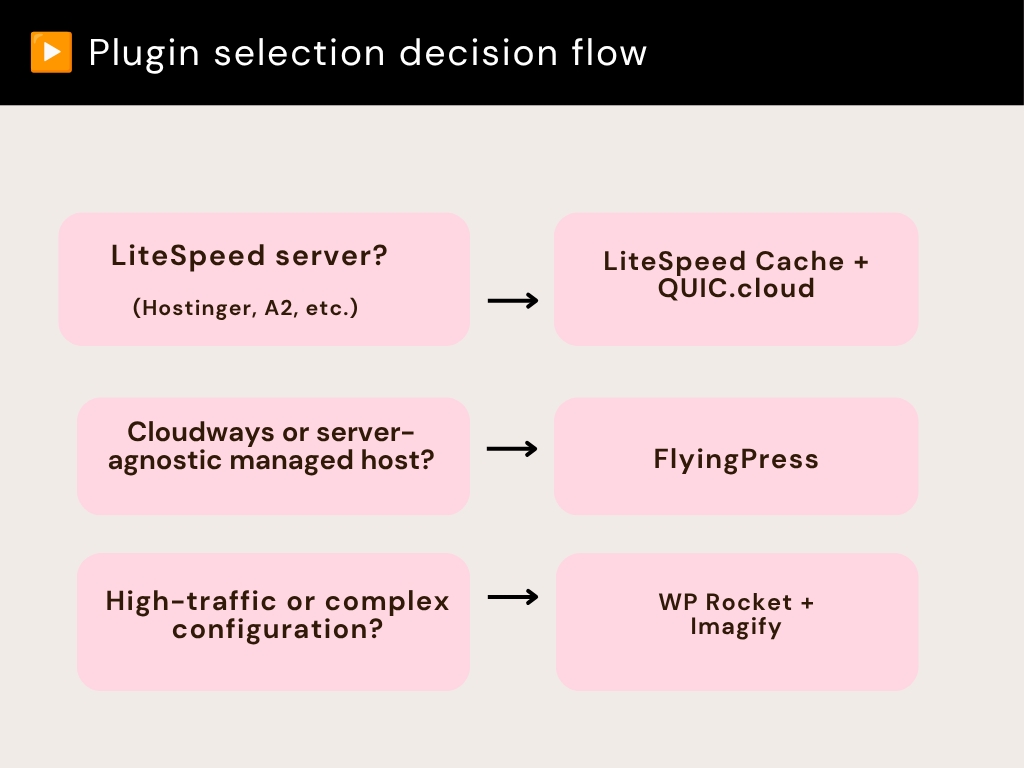
LiteSpeed Hosting: LiteSpeed Cache + QUIC.cloud
Servers running LiteSpeed (common on Hostinger, A2 Hosting, and many managed WordPress hosts) have native support for LiteSpeed Cache. This plugin communicates directly with the server’s caching layer in a way no other plugin can. On LiteSpeed hosting, it outperforms any alternative. For image optimisation, QUIC.cloud, LiteSpeed Cache’s companion service handles WebP conversion and compression natively within the same ecosystem.
Cloudways / Managed Hosts: FlyingPress
FlyingPress is purpose-built for performance and handles caching, image optimisation, critical CSS generation, and asset management in a single lean plugin. It integrates cleanly with Cloudflare and is straightforward enough to configure without deep technical knowledge, but powerful enough for demanding sites.
Complex or High-Traffic Sites: WP Rocket + Imagify
WP Rocket is the most mature and widely supported caching plugin available, with compatibility across a wide range of hosts, themes, and plugins. For image optimisation alongside it, we pair Imagify from the same development team ensuring the two work together without conflict.
Full Stack by Environment at a Glance
| Hosting Type | Caching | Images | CDN | Asset Management |
| LiteSpeed | LiteSpeed Cache | QUIC.cloud | Cloudflare / BunnyCDN | Custom code + Query Monitor |
| Cloudways | FlyingPress | Built-in (FlyingPress) | Cloudflare / BunnyCDN | Custom code + Query Monitor |
| Complex / High-traffic | WP Rocket | Imagify | Cloudflare Pro/Enterprise | Custom code + Query Monitor |
Image Optimisation: Plugin vs. Build Time
Our preferred approach is handling image optimisation before images ever reach the WordPress media library, sized correctly, compressed, and converted to WebP at build time. This means optimisation happens once and doesn’t depend on a plugin running correctly in the background.
That’s not practical for clients managing their own uploads, sites with large existing media libraries, or environments where build-time optimisation isn’t feasible. We rely on the image optimisation built into whichever caching plugin is already active. The key principle: never add a separate standalone image optimisation plugin on top of a caching plugin that already handles it. That’s redundant overhead and a potential source of conflicts.
Script & Asset Management: Where Plugins Fall Short
For controlling which CSS and JavaScript loads on which pages, our preference is custom code over plugins wherever the site architecture allows. A well-built WordPress theme should already be loading assets conditionally only where they’re needed, not globally across every page.
Where we need visibility into what’s loading and why, Query Monitor is the diagnostic tool we use before recommending any asset management plugin. For sites that can’t be restructured at the code level, plugins like Perfmatters or Asset CleanUp Pro can disable specific scripts on specific pages. These approaches address the symptoms while leaving the underlying issue unresolved. When a plugin loads unnecessary assets across the entire site, it reflects poor design. Replacing the plugin is often the most effective long-term solution.
CDN: The Layer That Amplifies Everything Else
No caching plugin operates in isolation. Pairing your setup with a CDN is what takes a fast site and makes it fast for everyone, regardless of where in the world they’re loading from.
Cloudflare
The free plan handles significant work: DNS-level DDoS protection, caching of static assets, and HTTP/3 support. For sites that need more full page caching at the edge, image resizing, advanced WAF rules, and priority routing the paid tiers deliver measurable improvements for global audiences. We use Cloudflare Enterprise for higher-tier clients, which adds dedicated support and SLA-backed performance guarantees.
BunnyCDN
For clients where Cloudflare’s pricing isn’t justified, or where a straightforward high-performance static asset CDN is all that’s needed, BunnyCDN is our recommendation. Cost-effective, fast, and it integrates cleanly with both WP Rocket and FlyingPress.
Update: If your site uses Bunny Stream for video delivery, we have something in the work that we think you will find useful, a shoppable video plugin built around the Bunny ecosystem that keeps your entire delivery infrastructure under one roof.
Stay tuned.
The Bottom Line
Speed optimization is the result of a well-structured stack. When each plugin serves a specific purpose and unnecessary overlap is eliminated, performance gains become much easier to achieve. The principle is the same across every environment: match the plugin to the hosting setup, not the other way around.
Not sure which stack is right for your site?
We audit WordPress performance setups every week. If your site is slow and you’re not sure why, we can tell you exactly what to change and do it for you.

Leave a Reply
Articles
Related Insights.
Blogs and Resources on WordPress, WooCommerce, SEO and Marketing


Leave a
Comment.